CREATIS CAD • WINDOWS 2D CAD

Professional 2D CAD.
Without the complexity.

Professional 2D CAD software for Windows with practical drawing, editing and annotation tools — an affordable, straightforward CAD application built for real technical drafting work.

$169AUD · One-off purchase
No recurring subscription required
for continued use of your purchased licence.
Buy Creatis — $169

Download the full Windows application and evaluate Creatis free for 14 days before you buy.

Creatis CAD 2D mechanical drafting workspace showing a dimensioned component drawing
DRAWPrecision geometry & measured input
MODIFYFamiliar CAD editing commands
ANNOTATEDimensions, text & drawing detail
DOCUMENTLayers, properties & file workflows
CAPABLE 2D DRAFTING

The tools you expect. Focused on the work you actually do.

Creatis is straightforward 2D CAD software for technical drawing and drafting, designed around practical workflows rather than burying everyday CAD commands inside a much broader platform.

01 / DRAW

Draw precisely

Lines, polylines, circles, arcs, rectangles, polygons, ellipses and construction geometry with object snaps, Ortho, grid and measured input.

02 / MODIFY

Change drawings quickly

Move, Copy, Rotate, Mirror, Offset, Trim, Extend, Stretch, Fillet, Chamfer, Break and Join using familiar CAD-style workflows.

03 / ANNOTATE

Finish the drawing

Dimensions, text, hatching and annotation tools help turn geometry into a drawing that can be understood and used.

04 / ORGANISE

Stay in control

Layers, editable Properties, blocks and drawing-management tools help keep detailed work organised.

05 / PRECISION

Snap where it matters

Endpoint, Midpoint, Center, Quadrant, Intersection, Perpendicular, Tangent, Node and Nearest object snap options support accurate drafting.

06 / WORKFLOW

Bring existing material in

DXF workflows, DWG import, PNG insertion and practical tools for working from existing drawing information.

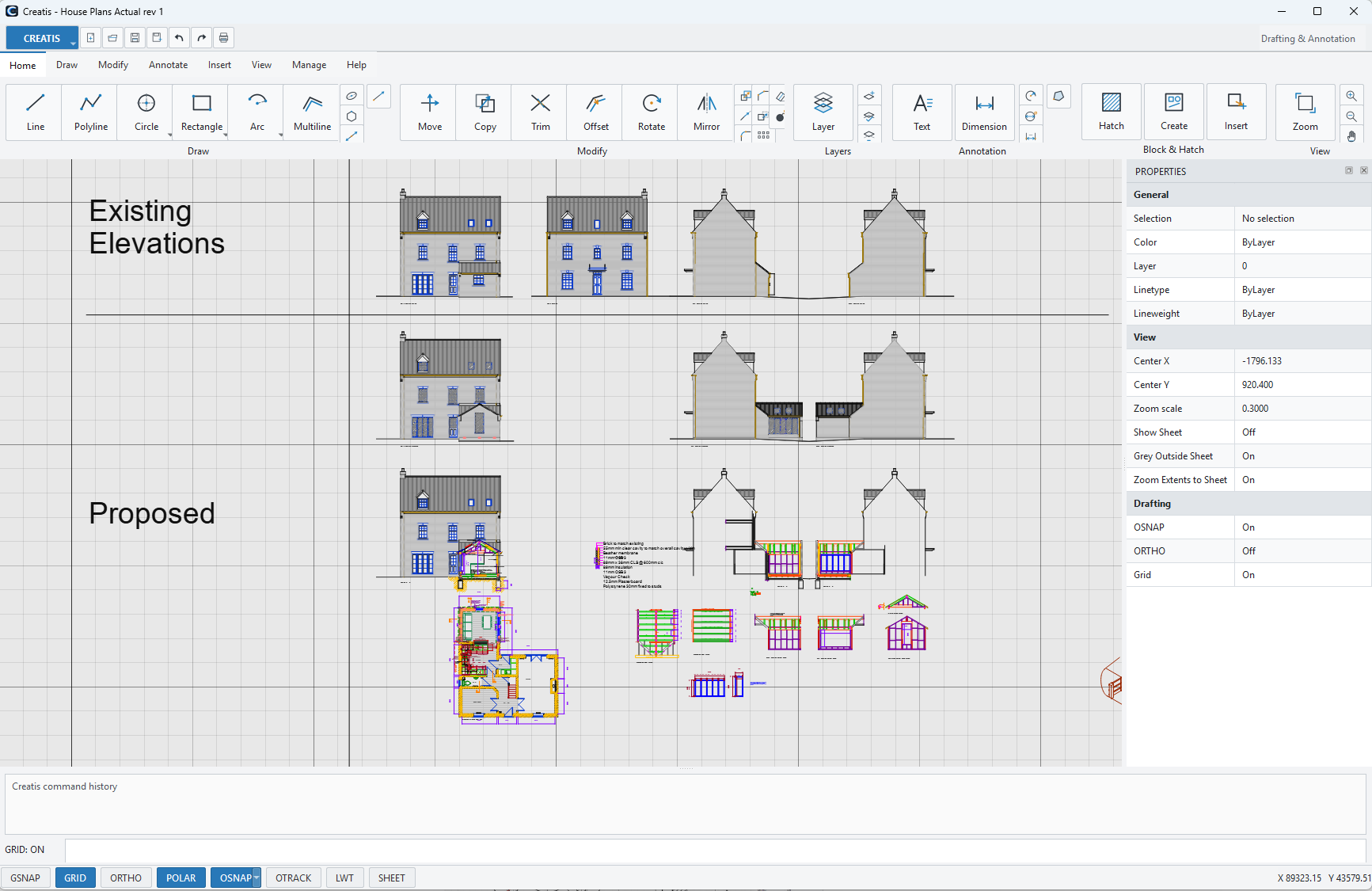
Creatis CAD workspace showing architectural plans and building elevations
SEE CREATIS IN ACTION

A real CAD workspace — not a marketing mock-up.

See Creatis in a genuine application workspace with the ribbon, Properties panel, command area and drafting controls visible.

Ribbon tools — commands organised around drafting work.
Properties panel — inspect and edit selected objects directly.
Command guidance — prompts and short command history while you work.
Metric & imperial — drawing units for different workflows.
FILE WORKFLOWS

Work with the drawings you already have.

Use Creatis as DXF drawing software for Windows, with DXF import and export plus a practical DWG import workflow for bringing existing CAD drawings into your workspace.

DXF

Import & export

Import DXF drawings into Creatis and export supported drawing content back to DXF. Imported drawings can be kept together for convenient selection and exploded when individual geometry needs editing.

DWG

Import workflow

Import existing DWG drawings into the Creatis workspace through the Creatis DWG import process. DWG export is not currently offered.

PROFESSIONAL 2D CAD SOFTWARE FOR WINDOWS

Practical 2D drafting tools for real design work.

Creatis CAD combines familiar 2D drawing and editing tools with a straightforward Windows desktop workflow. Create and edit technical drawings with lines, polylines, circles, arcs, rectangles and ellipses; use object snaps, dimensions, layers, blocks, hatching, text and practical modify commands including trim, mirror, offset, rotate, stretch, break, fillet, chamfer and explode.

DXF & DWG workflows

Work with DXF drawings and bring existing DWG drawings into Creatis through the established DWG import workflow. Calibration tools help when working with imported drawing geometry.

Metric & imperial drafting

Work in metric or imperial units, including architectural fractions, with object snaps and dimensioning designed for accurate 2D drafting.

Windows desktop CAD

Creatis is built as a Windows desktop application with a familiar ribbon, Properties panel, command prompts and drawing navigation. Recommended starting point: Windows 11 64-bit, modern Core i5 or Ryzen 5, 16 GB RAM and SSD storage.

STRAIGHTFORWARD OWNERSHIP

Creatis CAD

$169 AUD · ONE-OFF PAYMENT

Affordable professional 2D CAD software for Windows with a one-time purchase. Pay once, own your licence and keep using Creatis without an ongoing CAD subscription.

Secure checkout via Stripe. A$169 one-off purchase.

TRY BEFORE YOU BUY

14-Day Free Trial

Download Creatis and evaluate the real Windows application for 14 days before deciding whether it is right for your work.

Download Creatis for Windows and start your 14-day free trial when you open the application.

SIMPLE JOURNEY

Try it. Use it. Buy it when you're ready.

Download the full Windows 2D CAD application, use the 14-day trial, then purchase and activate Creatis when you are ready.

01

Download

Get the current Creatis Windows installer from the official website.

02

Trial for 14 days

Evaluate Creatis on real drawing work before making a purchase decision.

03

Purchase & activate

Purchase Creatis for $169 and activate your licence without a recurring CAD subscription.

COMMON QUESTIONS

Before you download.

No. Creatis is A$169 as a one-off purchase. There is no recurring subscription required to keep using your purchased licence.
Yes. Download Creatis for Windows and use the full application free for 14 days before deciding whether to buy.
Yes. Creatis supports DXF import and export workflows. Imported DXF drawings can be kept together for convenient selection and exploded when you need to edit individual geometry.
Creatis includes a DWG import workflow for bringing existing DWG drawings into the workspace. DWG export is not currently offered.
Creatis is a 64-bit Windows desktop application for Windows 10 and Windows 11. We recommend Windows 11, a modern Intel Core i5 or AMD Ryzen 5 processor or better, 16 GB RAM, SSD storage and a 1920×1080 or higher display. For large or complex DXF/DWG drawings, 32 GB RAM and fast NVMe storage are recommended.
Creatis includes a built-in Check for Updates feature. When a new version is available, Creatis will guide you through downloading and installing the latest release. Your existing licence, settings and drawings are retained when updating.
Your licence is linked to the email address used when you purchase Creatis. Enter that email address in Creatis and follow the verification prompt to activate. Your licence can be active on one computer at a time, and you can deactivate it before moving Creatis to another computer.
No. Once activated, Creatis can be used offline. An internet connection is needed occasionally to confirm your licence and is also required when activating, moving your licence to another computer or checking for updates.
EXPLORE CREATIS

Find the right 2D CAD workflow.

Learn more about Creatis for Windows, the free 14-day trial, DXF and DWG workflows, and straightforward one-time pricing.

Ask CreatisProduct information